
Published Date: May 1, 2026 | Last Updated: May 28, 2026
Overview
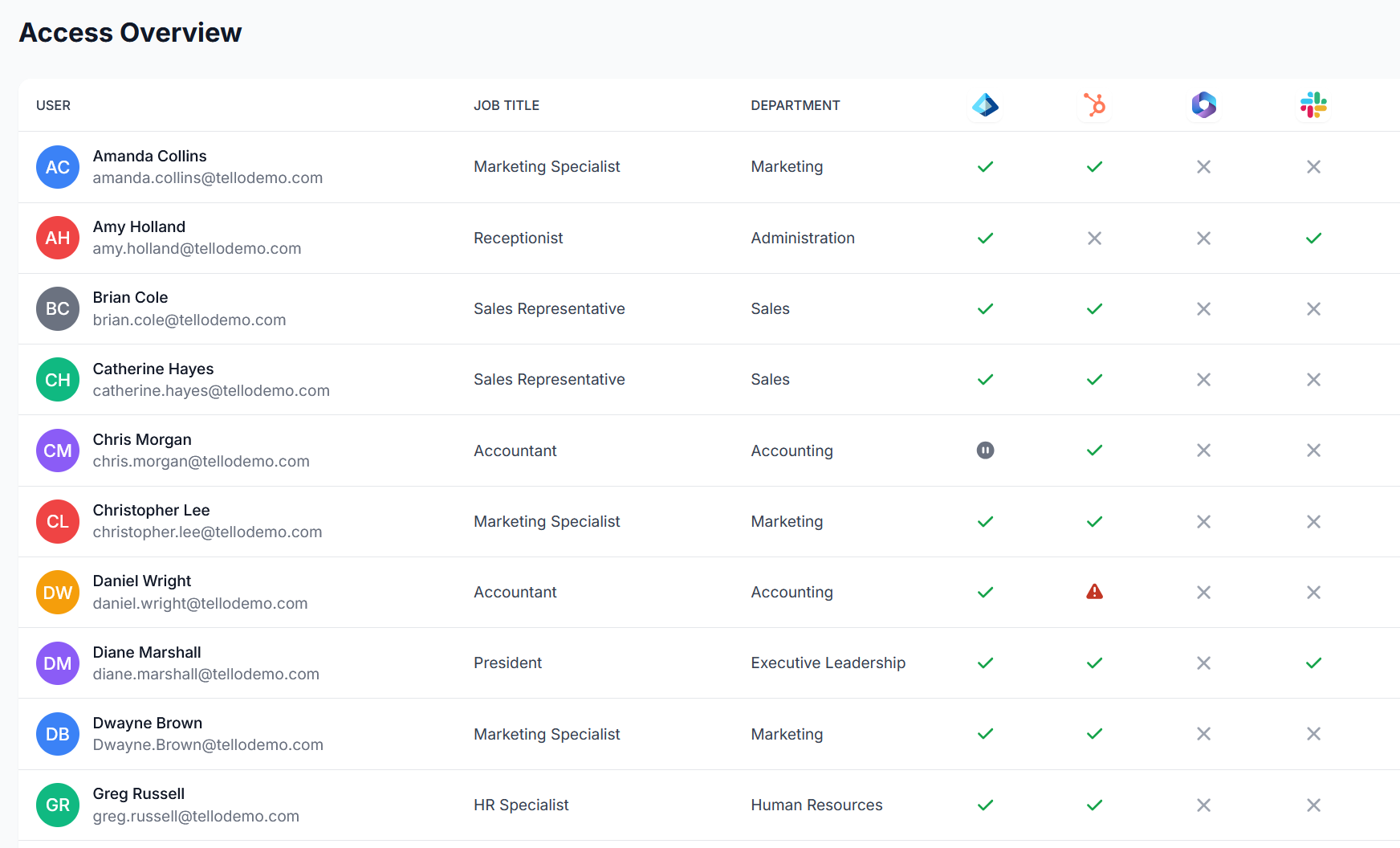
Access Overview is a live matrix of every User's current access across all connected integrations. Each row represents one User. Each column represents one integration. The cell at the intersection of a row and column indicates whether the User has active access in that application and the current provisioning state of that access.
Navigate to Access Overview in the left navigation to access the matrix.
Reading the matrix
Each cell in the Access Overview matrix reflects the current state of a User's access in a specific integration:
- A filled cell indicates the User has active access in that application
- An empty cell indicates the User has no access in that application
- A warning indicator in a cell signals an issue with that User's access in the corresponding integration — select the cell to review the detail and navigate to the User record to resolve it
The matrix reflects the current state in real time. It updates as integrations sync and as provisioning operations complete.
Using Access Overview for User Access Reviews
Access Overview is the primary tool for User Access Reviews (UARs) — periodic audits in which the organization confirms that every User holds only the access they are authorized to have. The matrix format makes it straightforward to:
- Scan for unexpected access — a User with access in an application they should not be in
- Identify Users who may need updates — a User missing access they should have
- Confirm that Role Template assignments have produced the intended provisioning state across the organization
Provisioning changes are not made directly in Access Overview. To update a User's access, navigate to the Users page and modify the User's Role Template assignments or direct access grants. See Managing Users for steps.
Filtering the matrix
Select Filters to narrow the matrix by:
- Department — view access for all Users in a specific department
- Integration — focus on a specific application column
- Status — surface Users with active issues or warnings
Filtering by department is particularly useful during UARs when reviewing access department by department.
Related articles
- Managing Users — update Role Template assignments and direct access grants
- Monitoring: Change History — timestamped log of all provisioning operations
- Monitoring: Reports — export User access data for audits and compliance
- Getting Started Part 8: Monitoring Access — overview of all 3 monitoring tools
 Seasoft Security Solutions LLC | TelloIAM